Building an Invoice Dashboard for Freelancers Within a Freelancer Platform
Context
YPLA is an MVP service for people who don’t work a traditional office schedule. It’s for self-employed freelancers who:
work remotely or on a project basis;
collaborate with Russian and international companies;
value their time and aim to streamline paperwork with clients;
prioritize transparency, security, and automation.
YPLA provides legal and financial support for contracts with Russian and international clients, including
document workflow, tax administration, and cross-border payments.
Invoice volume, GMV processed, revenue per active user
Discovery
Target audience
Primary audience: Freelance professionals in Russia aged 24-44 – the market core (65% combined: 24-34 = 33%, 34-44 = 32%). They are experienced and financially independent, often juggling multiple projects and needing clear tools to track income, invoices, and payment statuses.
Secondary (fast-growing) audience: Young freelancers aged 18-24 (16.7%), the most dynamic segment with +40% YoY growth (Jan-Oct 2024 vs 2025). They are early-career specialists entering the market quickly and are especially sensitive to simplicity and transparent payments/invoicing.
Define
Сustomer pain points
Invoicing feels overwhelmed because creating an invoice requires a lot of details and manual inputs.
Unclear payment status — users can’t instantly tell if an invoice is paid, overdue, or stuck in processing.
Clients don’t pay fast because the payment flow is confusing or has too many steps — they miss what to do next, postpone it, or drop off when the link opens, which leads to delayed payments and extra follow-ups.
Low trust in fee/tax calculations because the net amount and deductions aren’t transparent.
Awkward, stressful follow-ups — users feel shame/discomfort reminding clients to pay, so they delay chasing payments.
User JTBD
When I need to bill a client for completed work, I want to create and send an invoice quickly and without mistakes, so I can spend less time on admin and get paid sooner.
When I’m managing multiple projects and clients, I want to see what’s paid and overdue at a glance, so I can follow up on time and keep cash flow predictable.
When I send an invoice to a client, I want to share a simple payment link with clear next steps, so I can reduce friction and increase the chance of fast payment.
When I’m working with fees, taxes, and cross-border payouts, I want to understand the breakdown and payout timing clearly, so I can trust the system and plan my finances.
When an invoice is due or overdue, I want the platform to send polite, automated payment reminders (with my control over timing and tone), so I don’t feel awkward or ashamed chasing the client and still get paid on time.
Key product hypothesis
If we keep the primary flow Create → Send → Track → Paid extremely simple, then invoice volume and paid conversion will increase, because admin friction is the main dropout point.
If we add a searchable, filterable dashboard with priorities, users will manage overdue/paid invoices more effectively.
If we simplify the payment link flow and show clear next steps, clients will pay faster and more often.
If we show a transparent fee/tax breakdown + payout ETA, users will trust the system and plan cash flow better.
If we support one-click duplication and recurring invoices, repeat invoicing and retention will increase.
Ideate
User flows
Flow A: Create → Paid
Goal: increase Sent → Paid conversion + grow GMV/commission
Flow B: Overdue recovery
Goal: reduce overdue rate + improve paid conversion without support
In progress
Flow C: Fix & resend
Goal: reduce errors/disputes + improve trust + lower support cost
In progress
Prototype
Invoices Overview (Dashboard)
This screen is the main control center for freelancers to monitor invoice performance and take action without opening each invoice one by one. It combines lightweight analytics with a clear status breakdown, helping users spot overdue risks early and follow up before issues turn into support requests.
How the page drives key metrics
Prevents overdue (primary): the Next actions panel turns risk signals into one-click follow-ups (send reminders, follow up viewed invoices, complete drafts) → improves overdue rate, days past due, and recovery rate.
Improves Sent → Paid + speeds up cash collection: period stats (Paid/Unpaid/Overdue) + latest invoices + direct links help users spot blockers and act fast → increases Sent → Paid conversion and reduces time-to-pay.
Reduces support load: a single “source of truth” for invoice/payment progress (status split, trends, and recent activity in one place) reduces “where is my payment?” uncertainty → lowers tickets per 100 invoices and the share of payment-status tickets.
Drives repeat usage: quick period switching + lightweight analytics make the dashboard a daily check-in habit → supports WAU/MAU, invoices per active user, and D30 retention.
Grows processed volume: by making follow-up systematic and reducing friction, more invoices move from unpaid/overdue to paid → increases paid GMV processed (and commission).
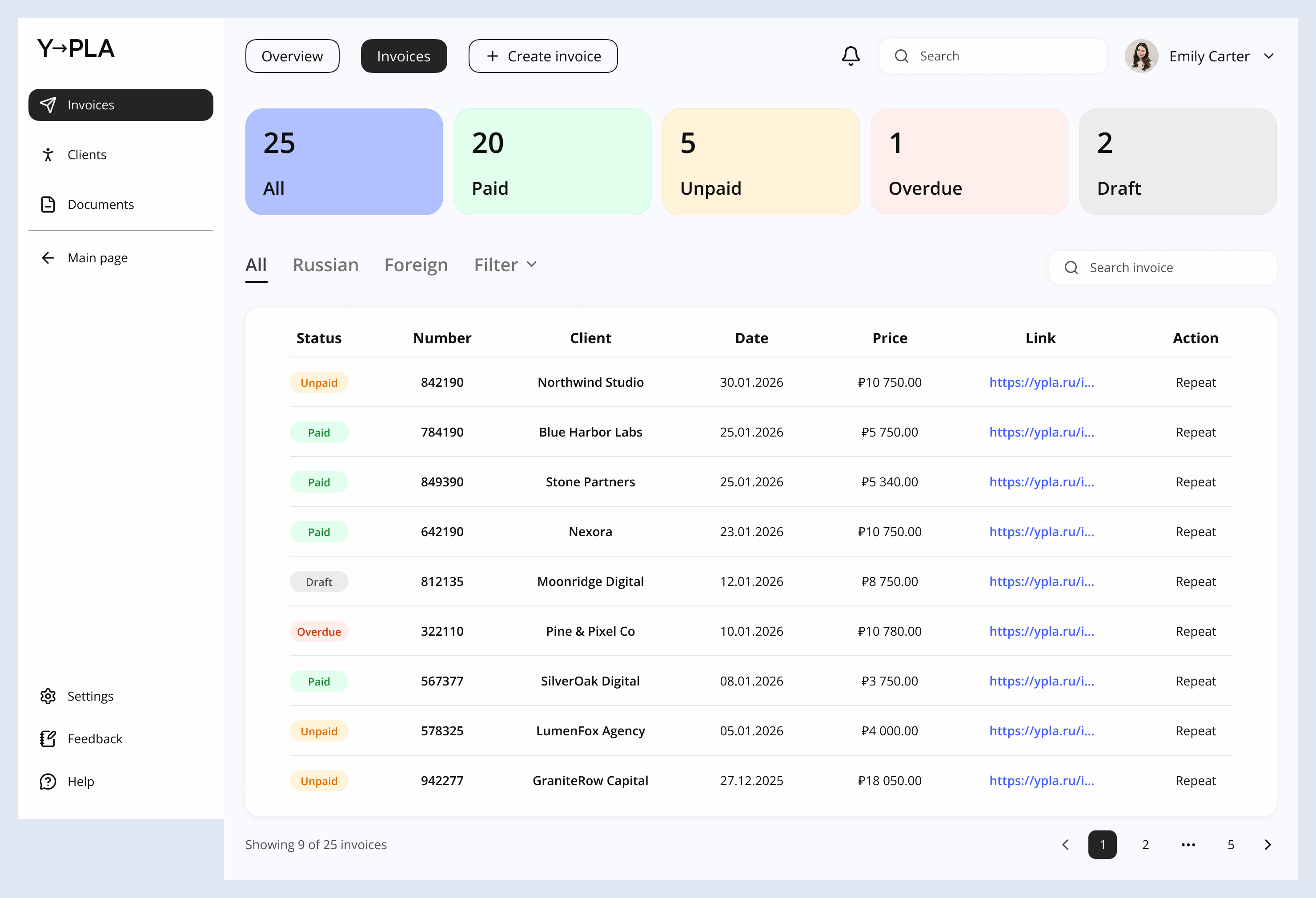
This page is the operational workspace for managing all invoices in one place. It’s designed for fast scanning, filtering, and repeat actions – so a freelancer can quickly understand what’s paid, what needs follow-up, and what can be reused for the next invoice.
How the page drives key metrics
Reduces overdue: status counters + filters highlight unpaid/overdue invoices early → improves overdue rate and days past due.
Improves Sent → Paid: quick access to invoice/payment links enables fast follow-ups and re-sends → boosts Sent → Paid conversion and reduces time-to-pay.
Lowers support load: clear status model + search helps users self-serve “what’s happening?” checks → reduces tickets per 100 invoices (esp. “where is my payment?”).
Increases volume & retention:Repeat action speeds up recurring invoicing → grows invoice volume and supports repeat usage.
Invoice creation
!
Invoice creation was split into clear steps to minimize errors through progressive validation and to reduce cognitive load by showing only the information needed at each stage.
Client details
Work description → Price → Files
Summary
How the page drives key metrics
Speeds up invoice creation: performer details are auto-filled from the user profile + structured step flow → reduces time to create invoice and increases invoice creation completion rate.
Reduces sending errors: full final-preview with editable fields before sending → lowers validation / correction rate and reduces voided / reissued invoices.
Improves Sent → Paid: user can download/print a clean invoice doc and confidently send it (less back-and-forth with the client/accounting) → improves Sent → Paid conversion and reduces time-to-pay.
Builds trust via transparency: visible cost breakdown (fee + tax + total) for both sides → reduces “why is the total different?” friction, lowering support tickets per 100 invoices (esp. payment/fees questions).
Supports real workflows with drafts:Save keeps invoices in Drafts for later review/approval → increases draft → sent conversion and improves retention (D30 / invoices per active user).
Success screen
How the page drives key metrics
Improves Sent → Paid: immediate confirmation + primary CTA to View invoice status keeps users in the follow-up loop → increases Sent → Paid conversion and reduces time-to-pay.
Reduces overdue: an automatic reminder is created right after sending → improves overdue rate and reduces days past due.
Lowers manual effort: status updates are delivered via notifications (no need to constantly check) → increases follow-up timeliness and reduces time-to-follow-up.
Lowers support load: users can self-serve via invoice status + history (single source of truth) → fewer tickets per 100 invoices (esp. “did it send?” / “where is my payment?”).
Supports business workflows:Print / Download PDF available post-send for accounting/approvals → increases PDF download rate and reduces delays caused by missing documents (indirectly improving time-to-pay).
Key Outcomes
Built an invoice dashboard + end-to-end invoicing flow that helps freelancers send invoices faster and get paid sooner.
Designed status-first navigation (overview + invoices list + invoice details) to surface due/overdue items and make follow-ups effortless.
Added final review (Summary) with editable fields and a transparent fee/tax breakdown to reduce mistakes and build trust.
Implemented a post-send confirmation + status tracking + automated reminders, reducing awkward manual chasing and preventing overdue invoices.
Supported real workflows with PDF/print, drafts, clients & documents as a single source of truth.
Impact on key metrics: higher Sent → Paid conversion, lower time-to-pay and overdue rate, fewer “where is my payment?” support tickets, and increased repeat usage/invoice volume.